Fraud Blocker
Automations

Tailor your KDS for your kitchen

Every kitchen runs differently. Now you can customize how Fresh KDS responds during service. Start with ready-made Automations or create your own for the situations that matter to your kitchen.

Upgrade plan
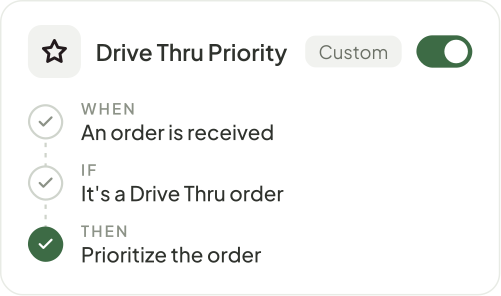
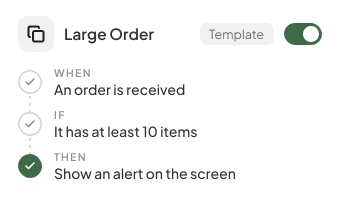
A custom Drive Thru Priority automation: when an order is received, if it's a Drive Thru order, prioritize the orderLong Cook Time automation, switched onCreate Automation buttonLarge Order template: when an order is received, if it has at least 10 items, show an alert on the screen

Keep your team focused on the food

Catch important details

Give the team a heads-up on slow-cook items and large orders so they can plan the work before it backs up.

Skip repeated steps

Automate routine screen actions and customer updates so staff can spend more time preparing food and getting orders out.

Fit your kitchen's flow

Choose responses for your menu, order types, and pickup routines so Fresh KDS supports the way your team works.

Ready-made automations

Give routine tasks an automatic response.

Call out slow-cook items, get a heads-up on large orders, or bring ready orders forward. Start with a template and adjust it for your kitchen.
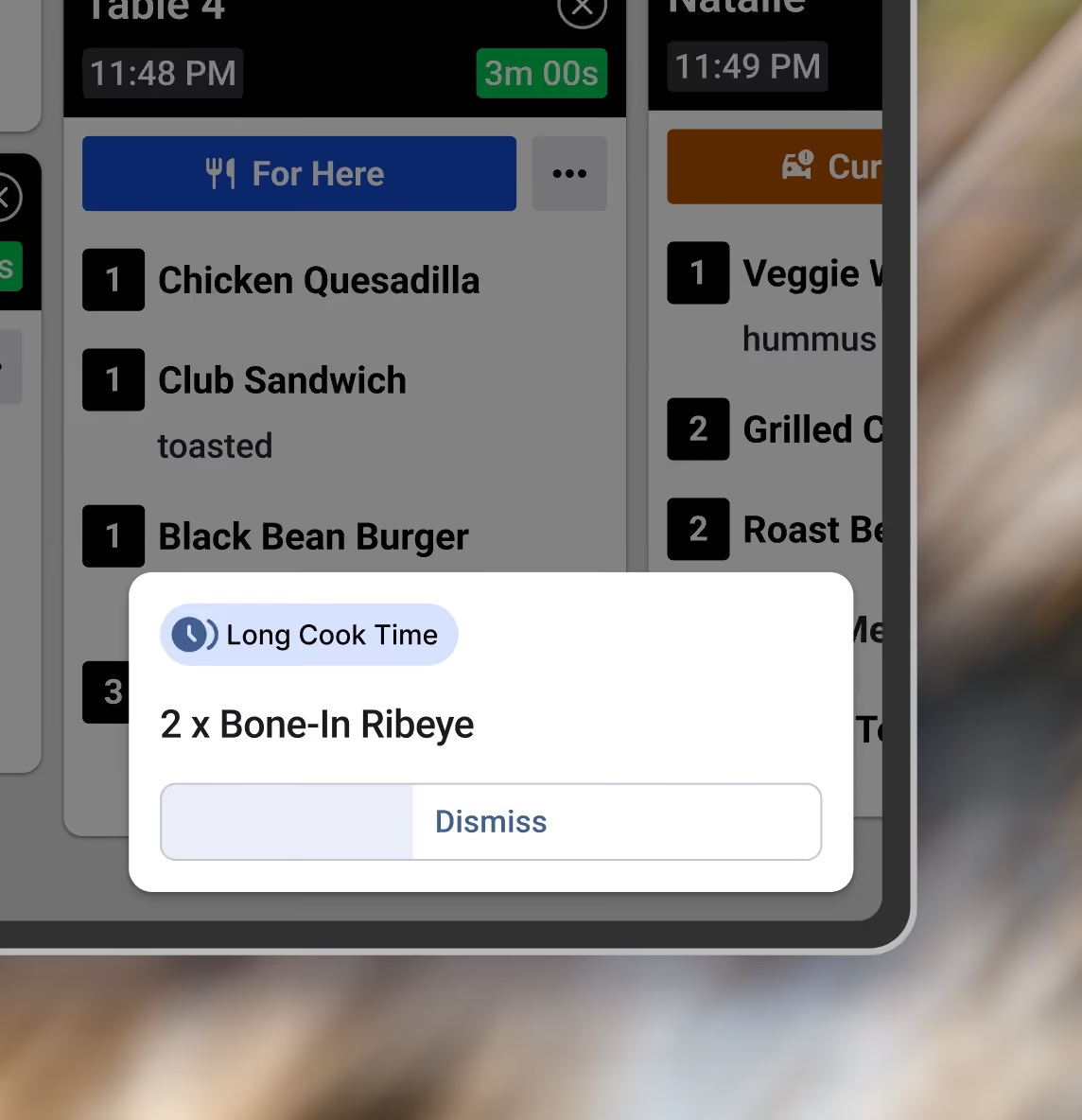
A Long Cook Time alert on a Fresh KDS screen for 2 x Bone-In Ribeye, with a Dismiss button that counts down
Long Cook Time
When an item is received and has a long cook time, show an alert on the screen.
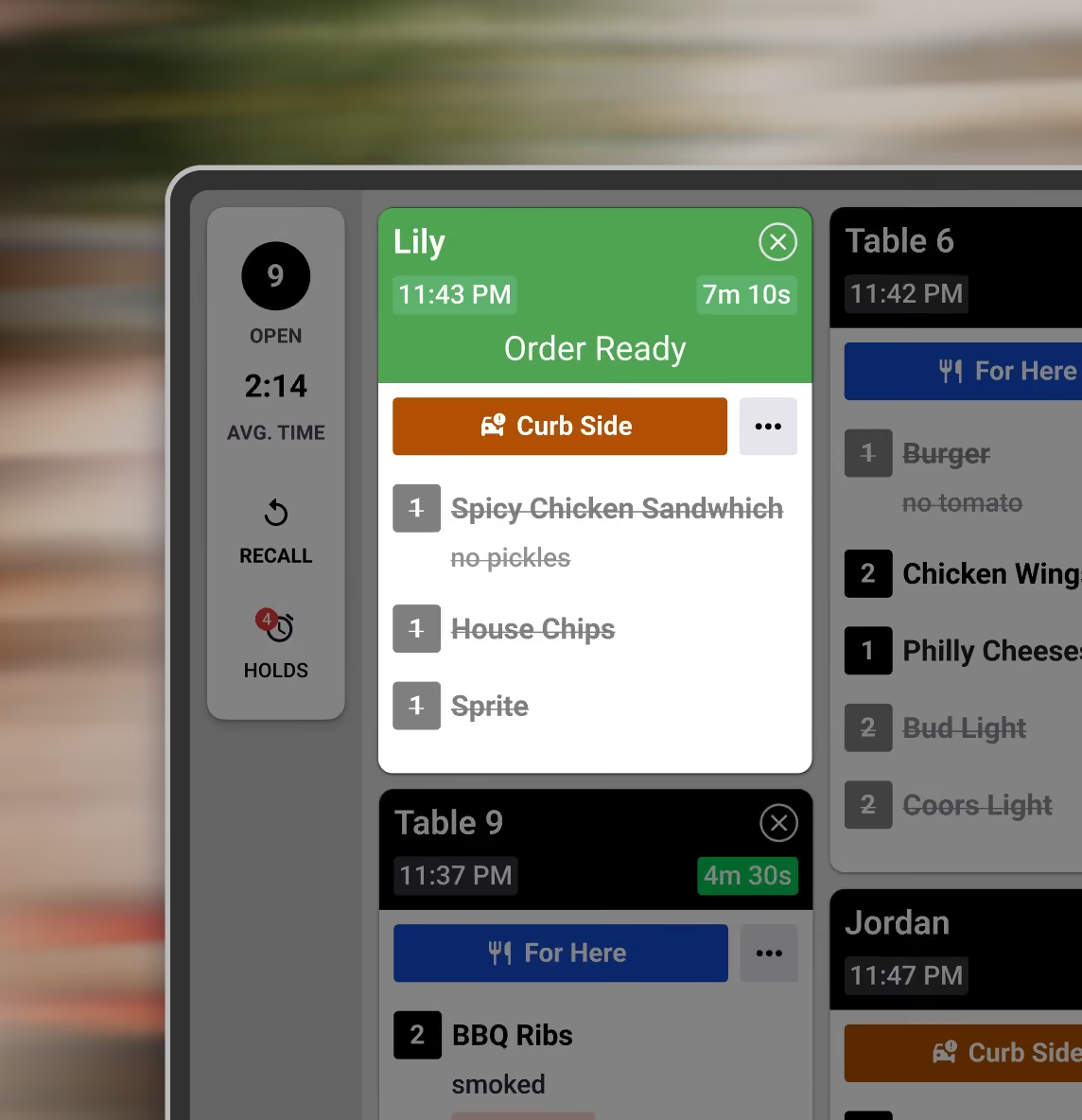
A Fresh KDS expo screen with a ready order, every item crossed out, moved to the front of the queue
Move Ready Orders to Front
When an order is ready, move the order to the front.
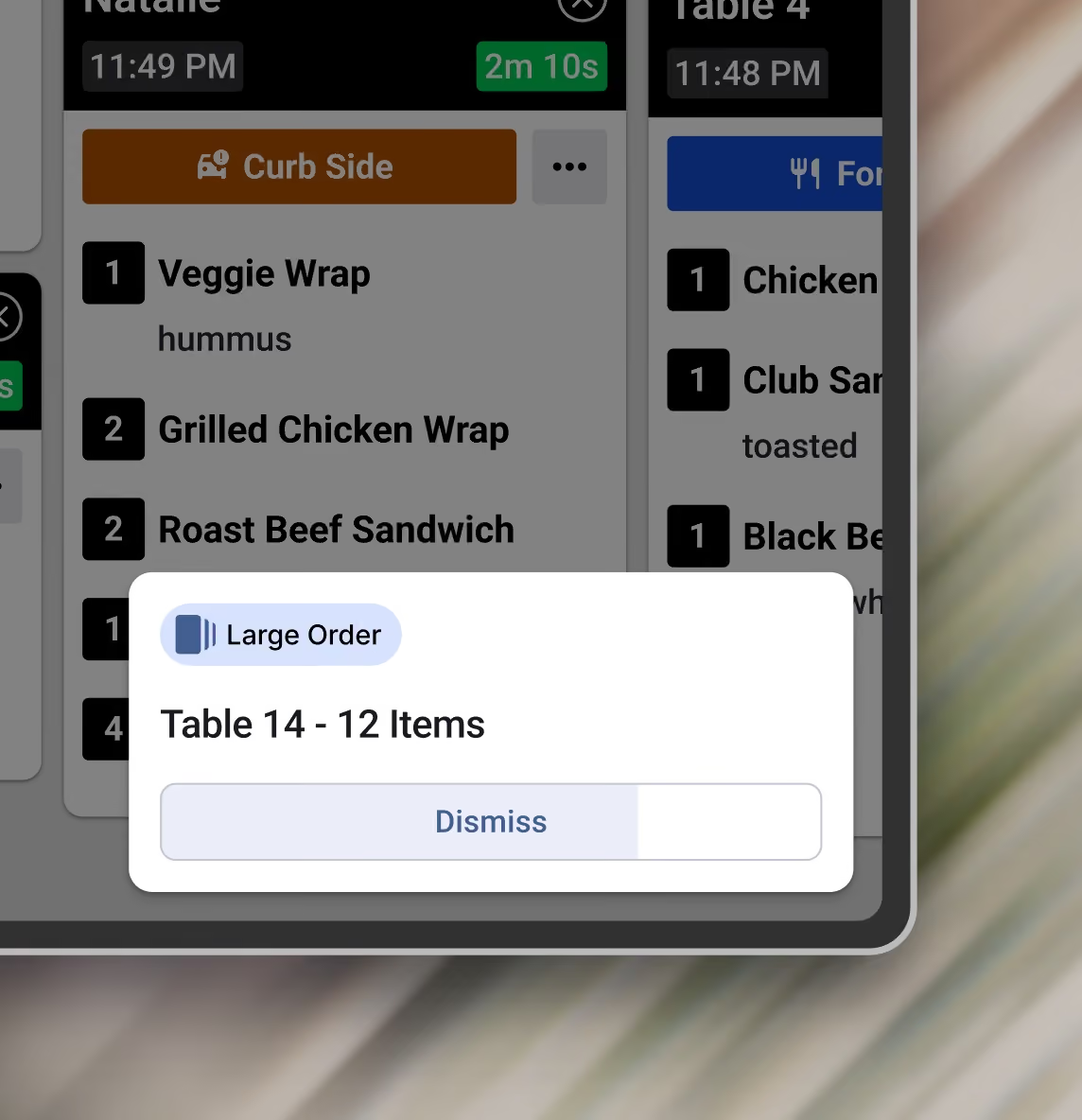
A Large Order alert on a Fresh KDS screen for Table 14 with 12 items, with a Dismiss button that counts down
Large Order
When an order is received, if it has at least 10 items, show an alert on the screen.
Custom automations

Tailor automations to your exact needs

Match a kitchen event with the details that matter, then choose one or more actions. Build rules for your menu, orders, and workflow.

Upgrade plan
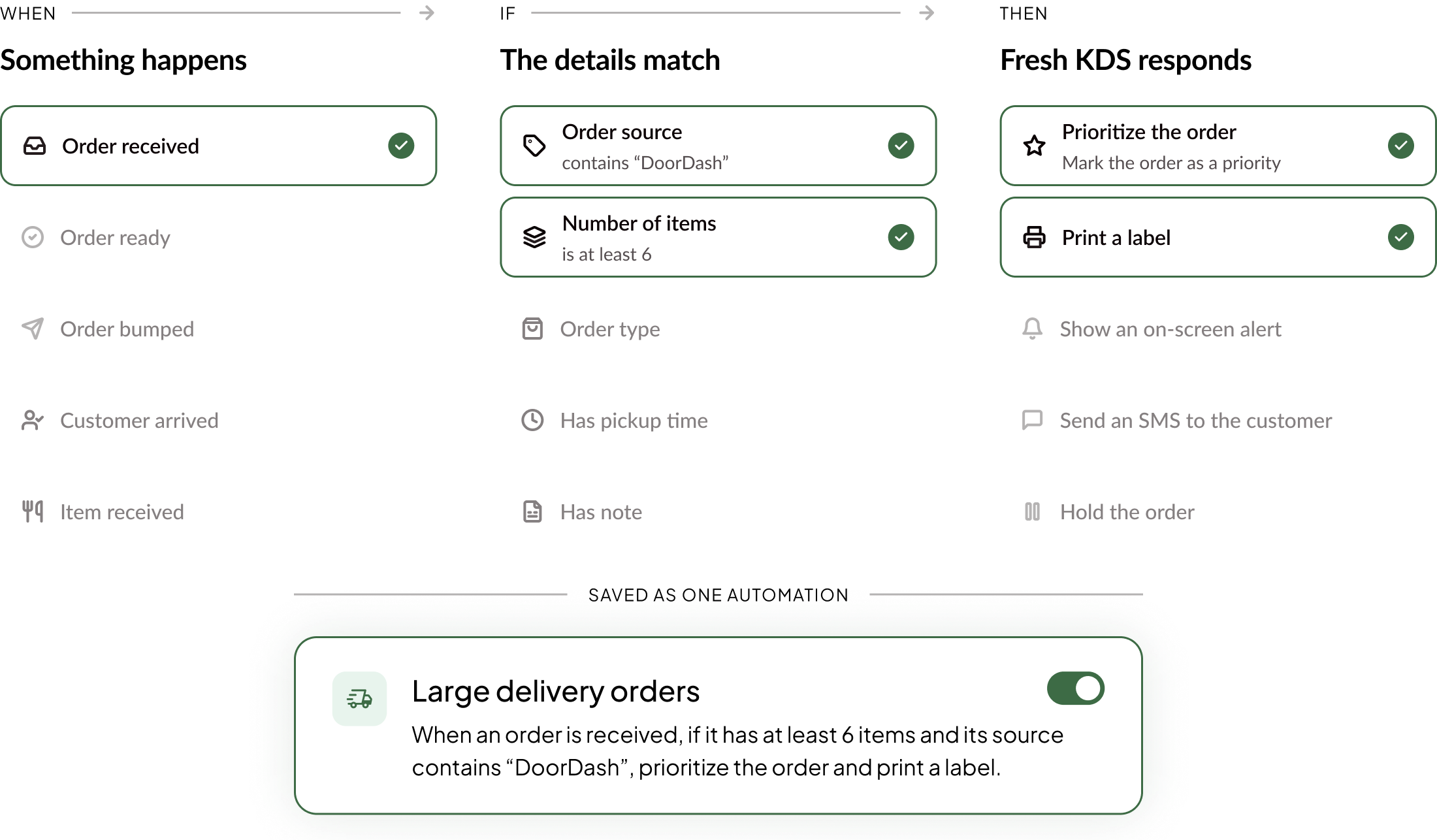
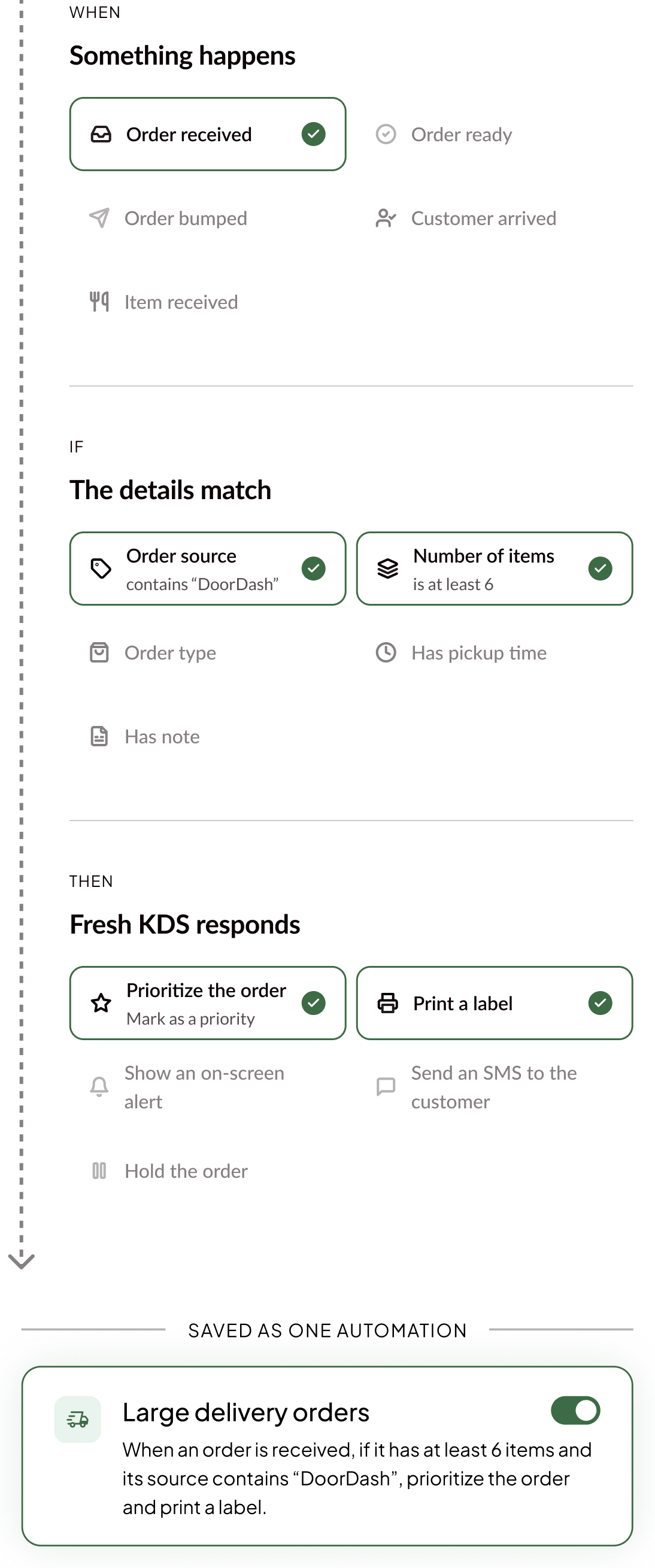
Building a custom automation: when an order is received, if its source contains DoorDash and it has at least 6 items, prioritize the order and print a label, saved as Large delivery ordersBuilding a custom automation: when an order is received, if its source contains DoorDash and it has at least 6 items, prioritize the order and print a label, saved as Large delivery orders
Manage your automations

Create once. Deploy everywhere.

Choose where it runs

Assign a saved automation to one screen or reuse it across the stations and locations that need it.

Update a shared rule

Edit it in your library and see how many screens the change will affect before you save.

Turn it on or off

Stop a shared automation across its assigned screens, then turn it back on whenever you need it.
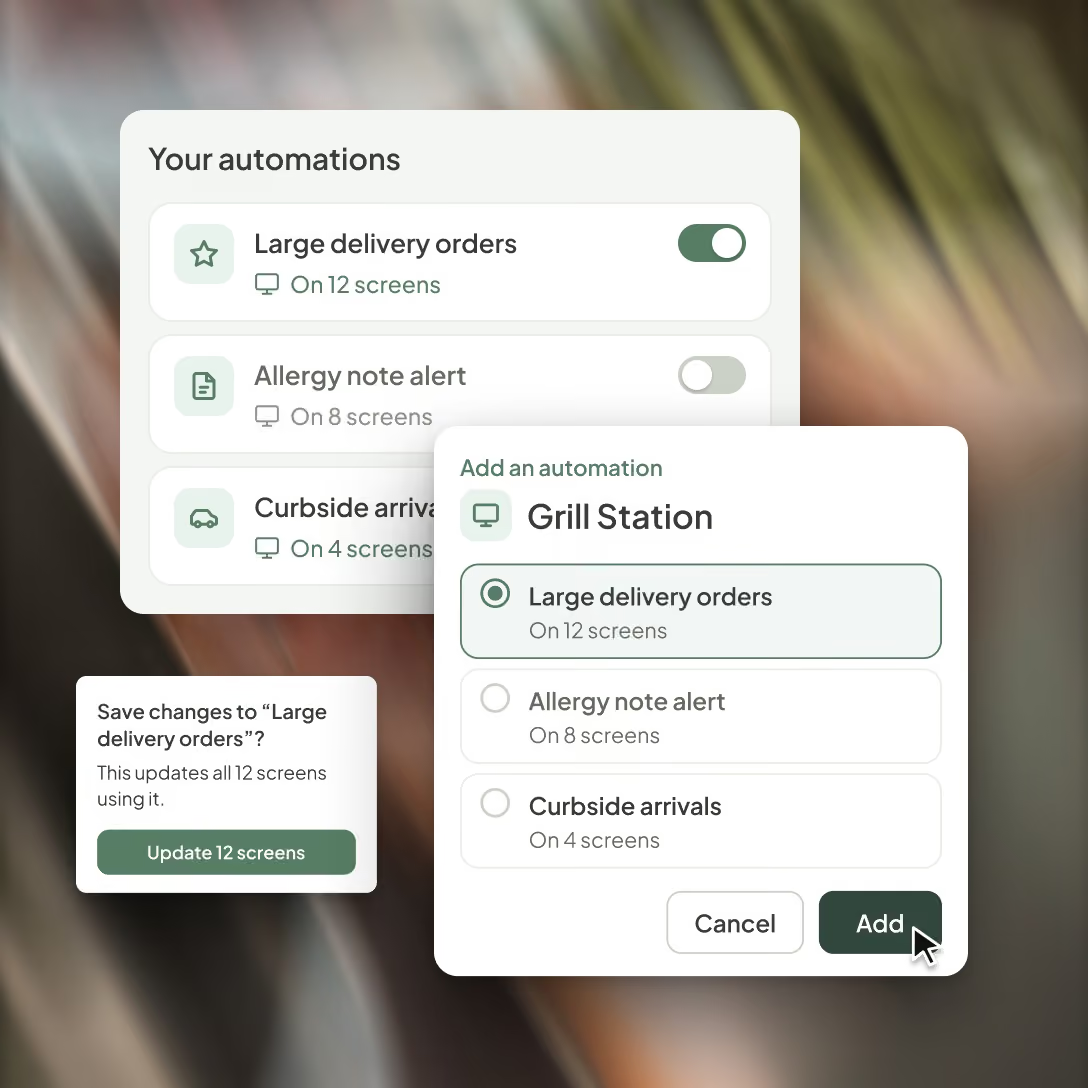
Managing automations in Fresh KDS: a library with on and off switches, a prompt showing a change will update 12 screens, and Large delivery orders being added to the Grill Station screen
Forfaits et tarifs

Upgrade your Fresh KDS plan to gain access

Upgrade your plan today and gain access to powerful features like Automations, Insights, Ingredient All Day Counts, Modifier Styles and more.
Mensuel
Annuel (économisez 20 %)
FORFAIT ACTUEL
Essentiel
Un point de départ simple pour les cuisines qui souhaitent remplacer les tickets papier et améliorer leur rapidité au quotidien.
20 $
par mois
par écran
facturé mensuellement
16 $
par mois
par écran
facturé annuellement
Inclut :
Compatibilité iOS et Android

Fresh KDS fonctionne avec n'importe quelle tablette ou écran tactile sous iOS 13+ ou Android 7+.

Black speech bubble icon with three white dots centered inside.
Déplacer, mettre en attente et rappeler des commandes

Réorganisez les commandes à l'écran, mettez-les en attente jusqu'à ce qu'elles soient prêtes à être préparées et rappelez les tickets précédemment validés.

Black speech bubble icon with three white dots centered inside.
Priorisation des commandes

Marquez manuellement les commandes critiques pour les faire ressortir, ou triez-les automatiquement pour garantir une préparation rapide.

Black speech bubble icon with three white dots centered inside.
Minuteurs et alertes personnalisés

Définissez des seuils de temps spécifiques pour les statuts de commande, offrant des alertes visuelles qui aident votre personnel en cuisine à gérer efficacement les temps de préparation.

Black speech bubble icon with three white dots centered inside.
Rapports sur la vitesse de service

Obtenez des rapports détaillés sur les indicateurs de votre cuisine, permettant de prendre des décisions basées sur des données pour améliorer l'efficacité et la qualité du service.

Black speech bubble icon with three white dots centered inside.
Notifications sonores

Personnalisez les sons de notification pour les nouvelles commandes, les mises à jour et les arrivées en bordure de trottoir, afin de tenir votre personnel informé sans perturber le flux de travail.

Black speech bubble icon with three white dots centered inside.
Le plus populaire
RECOMMANDÉ
Premium
Pour les cuisines en pleine croissance qui ont besoin d'une meilleure visibilité, d'une meilleure coordination et d'un meilleur contrôle pendant le service.
27 $
par mois
par écran
facturé mensuellement
22 $
par mois
par écran
facturé annuellement
Tout ce qui est inclus dans Essentials, plus :
Le plus populaire
Automatisations

Créez vos propres règles pour définir la manière dont Fresh KDS réagit pendant le service. Choisissez le déclencheur, définissez les conditions et décidez du comportement de vos écrans pour que Fresh KDS s'adapte parfaitement au fonctionnement de votre cuisine.

Black speech bubble icon with three white dots centered inside.
Impression d'étiquettes / tickets

Prenez le contrôle total des besoins d'impression de votre cuisine directement depuis Fresh KDS. Des tickets de commande complets aux étiquettes individuelles par article.

Black speech bubble icon with three white dots centered inside.
Comptage des ingrédients en continu

Obtenez le total des ingrédients en temps réel pour toutes les commandes en cours, sans aucun comptage manuel.

Black speech bubble icon with three white dots centered inside.
Communication sur écran

Chaque cuisine est unique. Fresh KDS propose de multiples options de communication sur écran pour que chaque poste reste parfaitement synchronisé.

Black speech bubble icon with three white dots centered inside.
Styles de modificateurs

Personnalisez vos modificateurs par mot-clé avec des couleurs et des formats de texte pour que les détails importants — comme les allergènes ou les demandes spéciales — ressortent à l'écran et réduisent les erreurs de préparation coûteuses.

Black speech bubble icon with three white dots centered inside.
Statistiques intégrées

Obtenez des analyses de performance en temps réel, avec l'affichage des temps de préparation moyens, du nombre de commandes et du détail des statuts directement sur votre KDS.

Black speech bubble icon with three white dots centered inside.
Messagerie client

Envoyez des SMS automatisés et personnalisables à vos clients pour les tenir informés de l'état de leur commande.

Black speech bubble icon with three white dots centered inside.
Changer de forfait

FAQ

Find quick answers to common questions about Automations, how they work, and how to set them up for your kitchen.
Get support
What are Fresh KDS Automations?
Is Automations included in my plan?
How do I set up an automation?
What can an automation do?
How do I choose which screens or locations run an automation?
Does Automations work with my POS?
How do alerts show up in the kitchen?
Can automations text my customers?
Automations

Take repeat tasks off your team's hands.

Get started with Fresh KDS to automate the screen actions and customer updates your team handles every shift.