
You know that feeling when you walk into a restaurant to grab your takeout order, and nobody seems to know where it is? Yeah, that's not just frustrating for you—it's a nightmare for the restaurant too. Welcome to the world where digital screen solutions are revolutionizing how restaurants handle pick-up orders, and honestly, it's about time.
The pandemic didn't just change how we order food—it completely rewired the restaurant industry's relationship with technology. Suddenly, pick-up and delivery weren't just nice-to-haves; they became the lifeline. And with that shift came the desperate need for digital systems that actually work.
Let me walk you through the landscape of digital screen solutions that are changing the game for restaurants handling pick-up orders. Trust me, this isn't your typical tech-bro sales pitch. This is practical stuff that can transform your operation from chaotic to composed.
What Exactly Is a Digital Ordering System?
Before we dive into the fancy screens and software, let's get crystal clear on what we're talking about. A digital ordering system is essentially the technology backbone that allows customers to place orders electronically—whether through your website, a mobile app, a third-party platform, or even a kiosk in your restaurant—and enables your kitchen and front-of-house staff to receive, prepare, and manage those orders efficiently.
Think of it as the conductor of your restaurant orchestra. It takes all those incoming order requests from different channels and makes sure everyone's playing the same tune.
The Core Components
A proper digital ordering ecosystem for pick-up orders typically includes:
- Order intake platforms (your website, apps, kiosks)
- Kitchen display systems (KDS) that replace paper tickets
- Customer-facing displays that show order status
- Back-end management software that ties it all together
The magic happens when these components actually talk to each other. That's where most restaurants struggle—they've got five different systems that don't communicate, and it shows in the customer experience.
Kitchen Display Systems: The Backbone of Modern Pick-Up Operations
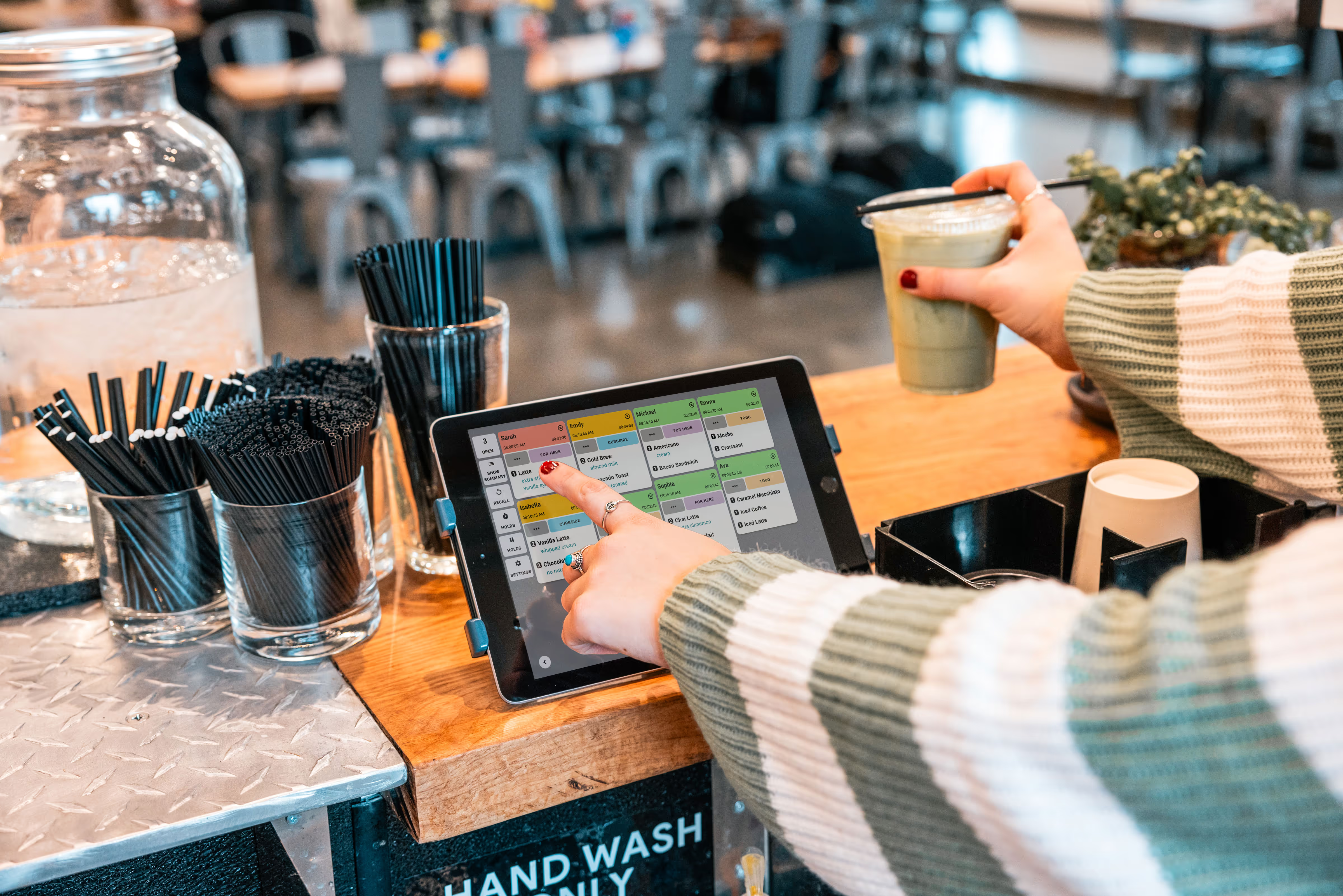
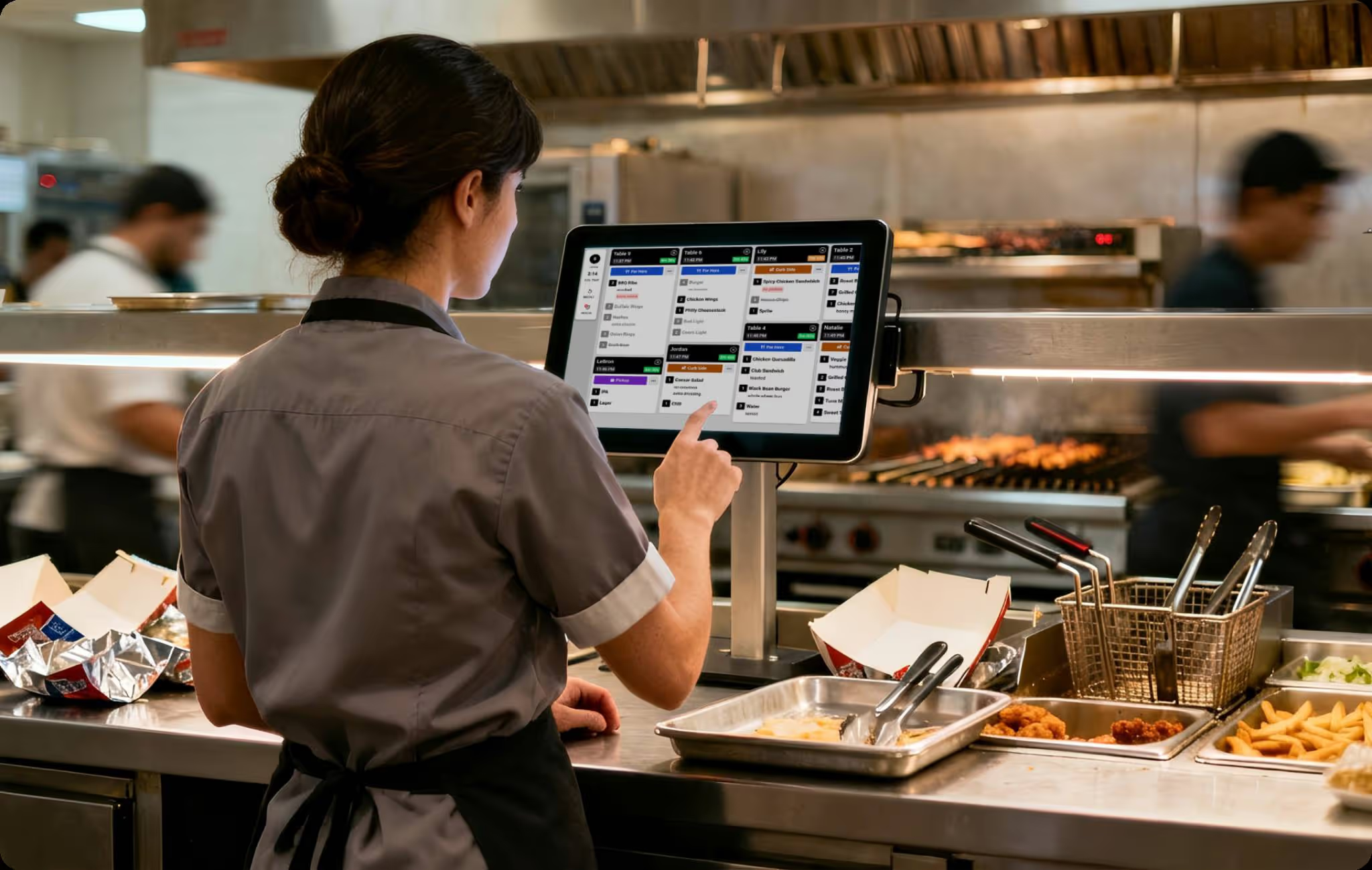
Let's start with the heart of any digital screen solution for pick-up orders: the Kitchen Display System, or KDS. If you're still using paper tickets in 2025, I'm not judging you (okay, maybe a little), but you're missing out on some serious operational advantages.
A KDS replaces those flimsy, grease-stained order tickets with digital screens that display orders in real-time. But here's the thing—a good KDS does so much more than just show what needs to be cooked.
Why KDS Matters for Pick-Up Orders
When it comes to pick-up orders specifically, digital menu boards and display systems give you visibility and control that paper simply can't match. You can prioritize orders based on pick-up times, flag which orders are running late, and instantly see which orders need to be bagged and ready at the counter.
Modern KDS solutions let you:
- Filter orders by type (dine-in, pick-up, delivery)
- Set automatic timers and alerts for each order
- Track order fulfillment times and identify bottlenecks
- Route specific items to specific kitchen stations
- Integrate with your POS system seamlessly
The 30/30/30 rule—which suggests restaurants should aim for 30% food cost, 30% labor cost, and 30% profit margin—becomes a lot more achievable when you can actually track and optimize your kitchen operations in real-time.
Customer-Facing Order Tracker Displays: The Unsung Hero
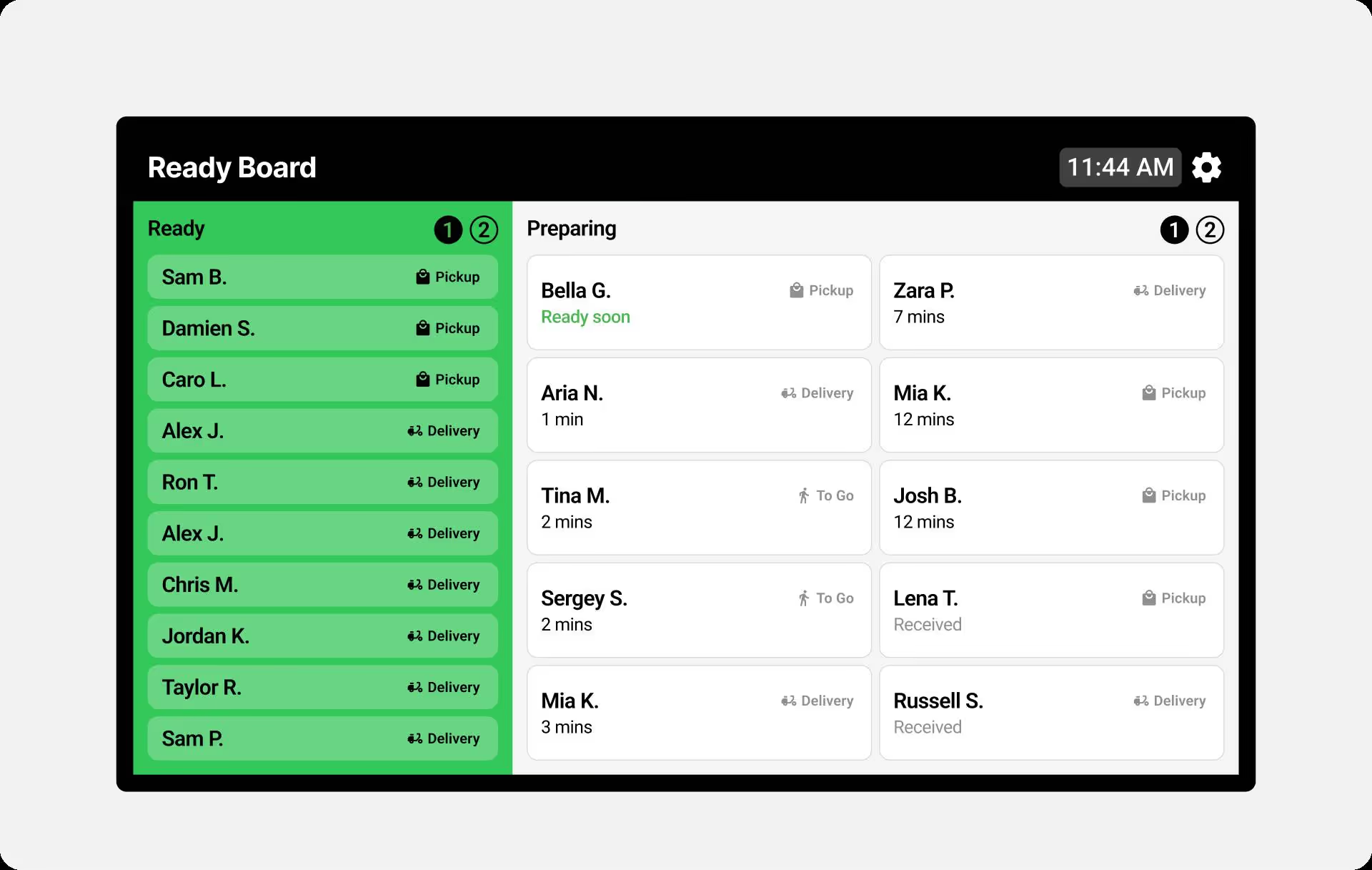
Here's where things get really interesting. While your kitchen staff is crushing it with their KDS, your customers are standing at the counter wondering if their order even exists. That's where customer-facing order tracker displays come in clutch.
Order tracker technology shows customers exactly where their order is in the preparation process. It's like the flight departure board at an airport, but for food. And just like those airport boards, it completely eliminates the anxiety of not knowing what's happening.
What Makes Order Trackers Essential
I've watched this transformation firsthand in dozens of restaurants. When customers can see their order number on a screen moving from "Preparing" to "Ready for Pick-Up," something magical happens: they stop asking staff about their order every 30 seconds.
The psychological impact is huge. People are willing to wait longer when they have visibility into the process. It's the same reason we're more patient with a pizza tracker than we are when we're left in the dark.
Key benefits of order tracker displays:
- Reduces counter congestion and customer inquiries
- Improves perceived wait times (even if actual times stay the same)
- Frees up staff to focus on preparing orders instead of answering questions
- Creates a modern, professional atmosphere
- Allows customers to wait comfortably in a designated area
Take-Out View Technology: Purpose-Built for Pick-Up
Now, if you're running a restaurant where pick-up orders are a significant part of your business, you need more than just a general KDS. You need a specialized take-out view that's designed specifically for managing pick-up operations.
A dedicated take-out view screen typically sits at your pick-up counter or expediting station, showing only the orders that are ready or about to be ready for customer pick-up. It's like having a dedicated air traffic controller for your to-go orders.
How Take-Out View Changes the Game
Think about the typical rush hour chaos: dine-in orders flying, delivery drivers waiting impatiently, and customers lining up at the counter for pick-up. Without a dedicated take-out view, your staff is constantly switching between screens or scrolling through a massive list trying to find the right order.
With take-out view technology, all pick-up orders are isolated on their own screen, usually organized by pick-up time or order status. Staff can instantly see:
- Which orders are ready and waiting
- Which customers have arrived for pick-up
- Which orders are running behind schedule
- How long each order has been sitting (nobody wants cold fries)
This separation of concerns—keeping pick-up orders on their own dedicated display—is what separates amateur digital implementations from professional-grade solutions.

What Software Do Most Restaurants Actually Use?
Let's talk real-world implementation. The software landscape for restaurant ordering systems is crowded, and honestly, kind of messy. But certain platforms have emerged as industry standards.
Most restaurants use one of these categories:
All-in-One POS Systems with OrderingThese include names like Toast, Square, Clover, and Lightspeed. They handle everything from taking payments to managing orders to running your kitchen displays. The advantage? Everything's integrated. The downside? You're locked into their ecosystem.
Specialized Restaurant Management PlatformsSolutions like Fresh KDS focus specifically on kitchen operations and order management. These often work with multiple POS systems (they're "POS-agnostic," in industry speak), giving you more flexibility.
Third-Party Ordering PlatformsDoorDash, Uber Eats, Grubhub—these platforms have their own order management tools, but they're primarily designed for delivery. If pick-up is a major channel for you, you'll want something more robust.
The best setup? Usually a combination. A solid POS system that integrates with a specialized KDS and customer-facing displays, while also pulling in orders from third-party platforms.
Digital Delivery Methods: How Orders Actually Reach Your Screens
Here's something most articles gloss over: how do orders actually get from your customer's phone to your kitchen screen? Understanding digital delivery methods is crucial if you want a system that actually works.
The 7 Stages of Order Taking
When we talk about digital order management, there are typically seven stages an order goes through:
- Order Placement - Customer submits order through website, app, or kiosk
- Order Confirmation - System validates the order and confirms with customer
- Order Routing - Order is sent to the appropriate kitchen station or screen
- Preparation - Kitchen receives and begins preparing the order
- Quality Check - Order is verified before packaging or sending to pick-up area
- Fulfillment - Order is marked ready and customer is notified
- Completion - Order is picked up and transaction is closed
Each stage needs to be reflected on your digital screens in real-time. That's what separates a basic order system from a sophisticated one.
Automation in Order Processing: The Future Is Here
Let's talk automation, because this is where things get really cool (and potentially scary if you're worried about technology replacing humans—spoiler: it won't, but it will make humans more efficient).
Modern digital screen solutions include automation features like:
- Automatic order acceptance from online platforms
- Smart routing that sends items to the correct prep station
- Dynamic prep time adjustments based on current kitchen load
- Automatic customer notifications when orders are ready
- Predictive analytics that help you prep for busy periods
The key word here is "automation," not "replacement." These systems handle the repetitive, time-consuming stuff so your staff can focus on what humans do best: cooking great food and providing excellent service.
Which Technology Allows Customers to Order from Their Table?
While we're focused on pick-up orders, it's worth mentioning tableside ordering technology because many restaurants now use the same screens for both dine-in and pick-up operations. Customers can use QR codes at tables to place orders directly from their phones, which then appear on the same KDS screens alongside pick-up orders.
The most common technologies for this are:
- QR Code Menu Systems (cheapest and easiest to implement)
- Tablet-Based Ordering (more interactive but requires hardware investment)
- Mobile App Ordering (best for building customer loyalty)
- Kiosk POS Systems (great for QSR environments)
The beauty of modern systems is that whether an order comes from a table, a phone, a kiosk, or your website, it all flows through the same digital pipeline.
Practical Implementation: What You Need to Know
Alright, enough theory. Let's talk about actually implementing digital screen solutions in your restaurant. I've seen plenty of botched rollouts, so here are the crucial considerations:
Screen Placement Strategy
Where you put your screens matters enormously. Your KDS screens need to be visible to kitchen staff without creating sightline issues. Customer-facing displays should be positioned where waiting customers naturally look, without causing congestion at the counter.
Typical screen setup for pick-up operations:
- One or more KDS screens in the kitchen (positioned by prep stations)
- A dedicated take-out view screen at the expediting or pick-up counter
- A customer-facing order tracker display in the waiting area
- Optional: tablet or screen at the host stand for managing order handoff
Integration Is Everything
I cannot stress this enough: your digital screens are only as good as the systems feeding them data. Make sure your chosen solution integrates cleanly with:
- Your existing POS system
- Third-party delivery platforms (DoorDash, Uber Eats, etc.)
- Your website ordering system
- Your inventory management software
- Your customer notification system (SMS/email)
If any of these connections are shaky, you'll end up with orders falling through the cracks. And in the restaurant business, a lost order isn't just a lost sale—it's a lost customer.
Training Your Team
Here's something nobody talks about: the human side of implementing new technology. Your screens can be perfect, but if your staff doesn't know how to use them effectively, you're wasting your money.
Budget time for proper training. Make sure everyone understands:
- How to read the displays accurately
- What to do when orders are running late
- How to mark orders as complete
- Who to contact when the system has issues
- The backup plan if screens go down (yes, you need one)
The Real ROI of Digital Screen Solutions
Let's talk money, because that's what really matters. Digital screen solutions for pick-up orders aren't cheap—a proper setup might run you anywhere from a few thousand dollars to tens of thousands depending on your restaurant size and needs.
But here's the thing: the ROI is usually pretty compelling when you factor in:
Labor EfficiencyStaff spends less time searching for orders, answering customer questions, and fixing mistakes. In a typical operation, this can reduce front-of-house labor needs during peak hours by 15-20%.
Order AccuracyDigital systems dramatically reduce miscommunication between front-of-house and kitchen. Fewer mistakes mean less wasted food, fewer comps, and happier customers who actually come back.
Customer ThroughputWhen you can process pick-up orders faster and more reliably, you can handle higher volume during peak periods. That's direct revenue impact.
Reduced Customer Wait TimesFaster fulfillment means customers spend less time waiting and more time being impressed with your efficiency. That translates to better reviews and word-of-mouth marketing.
Choosing the Right Solution for Your Restaurant
Not all digital screen solutions are created equal, and what works for a high-volume QSR might be overkill (or underkill) for your operation. Here's how to think about selecting the right system:
Consider Your Order Volume
If you're doing fewer than 20 pick-up orders per day, you might be fine with a basic POS system that includes simple order management. But if pick-up orders are a major revenue stream—say, 100+ orders daily—you need robust, specialized tools.
Think About Your Space
Physical layout matters. A cramped kitchen needs compact, strategically placed screens. A large operation might need multiple displays throughout different prep areas. Walk through your space and visualize where information needs to flow.
Factor in Your Tech Stack
What technology are you already using? Starting from scratch gives you more flexibility, but most restaurants are working with existing systems. Choose solutions that play nice with what you already have.
Plan for Growth
I see restaurants make this mistake constantly: they buy a system for their current needs without thinking about where they'll be in two years. If you're planning to expand, open additional locations, or significantly grow your pick-up business, choose a solution that scales.
Common Pitfalls to Avoid
Let me save you some headaches by sharing the mistakes I see restaurants make repeatedly:
Buying the Cheapest Option - Restaurant margins are tight, I get it. But skimping on your digital screen solution is like buying cheap knives—you'll pay more in the long run through inefficiency, errors, and eventually replacing the whole system.
Ignoring Staff Input - Your kitchen manager and expo staff are the ones who'll use these screens every day. Get their input before you buy. They'll spot workflow issues you'd never think of.
Underestimating Setup Time - Most restaurants expect to have their new digital screens up and running in a week. Reality? Plan for at least a month of setup, integration, and training. Maybe more.
Forgetting About Support - When your order screens go down on a Friday night, you need support now. Choose vendors who offer real-time support, not ones where you're filling out tickets and waiting 48 hours for a response.
The Future of Restaurant Pick-Up Technology
We're still in the early innings of digital transformation in restaurants. Here's what's coming down the pipeline:
AI-powered systems that predict order volume and automatically adjust prep schedules. Computer vision technology that verifies orders are complete before they're bagged. Integration with smart lockers for contactless pick-up. Augmented reality displays that help kitchen staff plate orders perfectly.
The restaurants that invest in solid digital screen infrastructure now will be positioned to take advantage of these advances. The ones still using paper tickets? They're going to struggle to catch up.
Making It Work: Your Action Plan
If you're ready to implement or upgrade your digital screen solutions for pick-up orders, here's your roadmap:
- Audit your current system - What's working? What's causing bottlenecks?
- Define your requirements - Order volume, integration needs, space constraints
- Research solutions - Look for systems that fit your specific operation
- Get demos - Actually see the systems in action, preferably in restaurants similar to yours
- Calculate realistic ROI - Factor in both hard costs and soft benefits
- Plan implementation - Timeline, training schedule, backup systems
- Execute carefully - Consider a soft launch during slower periods
- Gather feedback - From staff and customers, then iterate
The Bottom Line
Digital screen solutions for restaurant pick-up orders aren't just about looking modern or keeping up with trends. They're about running a more efficient, more profitable operation that delivers a better customer experience. In a business where margins are razor-thin and competition is fierce, that matters enormously.
The restaurants winning in 2025 are the ones that have embraced technology not as a replacement for human expertise, but as a tool that amplifies it. Your digital screens should make your staff more effective, your kitchen more coordinated, and your customers more satisfied.
Pick-up orders are here to stay. The question isn't whether you need better digital solutions—it's whether you're ready to implement them before your competition does.
Ready to transform how your restaurant handles pick-up orders? The technology is here, proven, and more accessible than ever. The only question is: what are you waiting for?
Ready to try Fresh KDS in your restaurant?




.png)


.webp)


