Communication entre écrans
Communication entre écrans
Synchronisez tous vos postes en cuisine
Chaque cuisine est différente. Fresh KDS propose plusieurs options de communication entre écrans pour garder chaque poste parfaitement synchronisé.

Chaque cuisine est différente. Fresh KDS propose plusieurs options de communication entre écrans pour garder chaque poste parfaitement synchronisé.
Découvrez Fresh KDS grâce à notre démo interactive. Découvrez à quel point la gestion des commandes peut être simple.
Communication entre écrans assure une coordination fluide entre plusieurs postes de cuisine grâce à une gestion synchronisée des commandes et à des transitions de flux efficaces.
Principaux avantages :
Comment ça marche :
Fresh KDS propose des options de communication entre écrans flexibles pour s'adapter à différents flux de cuisine :
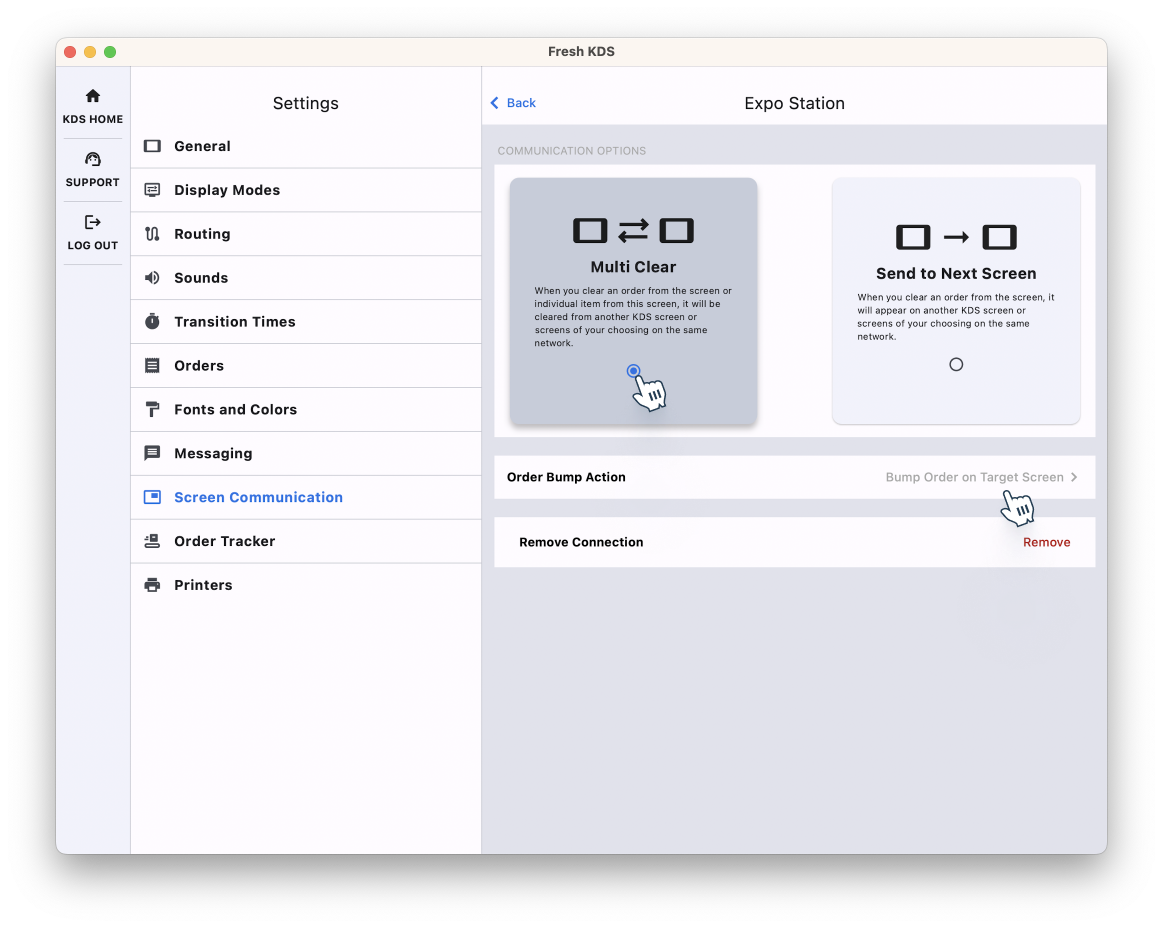
Pour configurer la communication entre écrans, assurez-vous que tous les écrans KDS sont connectés au même réseau Wi-Fi. Dans l'application Fresh KDS, allez dans Paramètres > Communication entre écrans, activez la fonctionnalité et configurez les options de communication de votre choix.
En mettant en place la Communication entre écrans, votre cuisine atteint un niveau de coordination supérieur, réduit les erreurs et maintient un flux de commandes constant, de la préparation à la livraison.
Cette fonctionnalité est disponible exclusivement avec les forfaits Premium et Unlimited. Pour en savoir plus sur la modification de votre abonnement Fresh KDS, cliquez ici.
Pour en savoir plus sur le fonctionnement de la communication entre écrans, consultez cet article d'aide, ou explorez la fonctionnalité plus en détail ici.
Découvrez toutes les manières dont vous pouvez rationaliser les opérations de votre cuisine avec Fresh KDS.
Commencez votre essai de 7 jours de Fresh KDS dès aujourd'hui en configurant votre compte. Le processus est totalement gratuit et ne prend que quelques minutes. Aucune carte de crédit n'est requise et vous pouvez annuler à tout moment.
Commencez, c'est gratuit.png)


.webp)



.avif)



.avif)


.avif)


.avif)